
Inspire Planner vs TaskRay
Two Salesforce-native project management apps. One detailed comparison to help you choose the right fit for your team.
How Do They Compare?
Both Inspire Planner and TaskRay are 100% Salesforce-native project management applications available on the AppExchange. Both are highly rated with identical 4.95/5 ratings. Both store data inside your Salesforce org and leverage Salesforce security.
The difference is where they lead. TaskRay is strongly positioned around customer onboarding and delivery workflows. Inspire Planner is the better fit for teams that need broader project management across Waterfall, Agile, and Task List methodologies, plus portfolio management, resource planning, and standard Salesforce Task integration.
This page breaks down the key differences so you can make an informed decision for your team. For a comprehensive overview of managing projects in Salesforce, see our Salesforce Project Management guide.
Quick Verdict
Choose Inspire Planner if you want one Salesforce-native solution for schedule-driven Waterfall projects, Agile sprints, Task Lists, portfolio visibility, resource planning, external collaboration, and execution through standard Salesforce Tasks.
Choose TaskRay if your main priority is customer onboarding and implementation delivery inside Salesforce, especially if you want a product heavily packaged and positioned for onboarding workflows.
Feature-by-Feature Comparison
| Category | Inspire Planner | TaskRay |
|---|---|---|
| Salesforce-Native | Yes — 100% native, data stays in Salesforce | Yes — 100% native, data stays in Salesforce |
| Project Methodologies | Waterfall (Gantt), Agile/Scrum (Kanban + Sprint planning), and Task Lists — all in one app | Multiple project views including Gantt, Kanban, Calendar, and List. Supports 4 dependency types and baselines (Standard and Premium). Product positioning centers on onboarding workflows rather than schedule-driven project planning |
| Task Management | Uses standard Salesforce Tasks — your team's existing tasks, reports, and automation work out of the box | Uses custom TaskRay task objects — requires separate reporting and automation from standard Salesforce Tasks |
| Dashboards | Built-in LWC Project Dashboard and Portfolio Dashboard included in the managed package — no separate app required. Native Salesforce reports and dashboards combine project data with any Salesforce object | Salesforce reports and dashboards by edition. Standard adds Portfolio View and Project Insights. Separate “TaskRay Dashboards” app available on AppExchange (3.4/5, 5 reviews). Lightning components for Projects, Status, Snapshot, My Work, and Board views |
| Task Console | Cross-project task management console with 4 view modes, grouping, KPI summary, inline editing, and time logging | No equivalent cross-project task console |
| External Project Portal | External Project Portal — external contacts can view project schedules and dashboard, update task status and progress, use checklists, and communicate with the internal team via task-level chat. No Salesforce or Inspire Planner license required for external contacts | Three external collaboration models: Collaboration View (read-only project status), Collaboration Connect (access assigned tasks, mark complete, leave comments, interact with Screen Flows — without full TaskRay access), and Collaboration Hub (fuller portal on Digital Experience Sites, requires designated external licenses). Available in Standard and Premium |
| Time Tracking | Built-in time tracking: daily view, weekly timesheets, stopwatch. Log time against any Salesforce object. Integrated into the Task Console for cross-project time entry. Available in Pro plan ($35/user/month) | Time tracking with timer, timesheet, and time logging on tasks and checklists. Available in Standard ($40/user/month) and Premium ($60/user/month) |
| Agentforce Integration | Planned | TaskRay + Agentforce integration available |
| AppExchange Reviews | 170+ reviews, 4.95/5 rating | 329 reviews, 4.95/5 rating. Review counts as of April 2026 — check AppExchange for current figures |
| Free Trial | 30 days, full access | 30 days |
| Category | Inspire Planner | TaskRay |
|---|---|---|
| Gantt Charts | Interactive Gantt with 4 dependency types (FS, SS, FF, SF), critical path analysis, baselines, and milestone tracking. Schedule-first product design built around Waterfall planning | Supports 4 dependency types and baselines (Standard and Premium). Multiple project views including Gantt, Kanban, Calendar, and List. Product positioning centers on onboarding workflows rather than schedule-driven project planning |
| Resource Management | Skill-based resource search, capacity planning, hard/soft bookings, PTO tracking. Available in Pro plan ($35/user/month) | Resource management capabilities across all editions. Starter includes Dynamic Team Builder. Standard adds Resource Assignment, Role Assignment, and Historical Utilization. Premium adds Resource Planner, Capacity Analytics, and Forecasting |
| Portfolio Management | Portfolio dashboards with project health matrix (RAG indicators across Budget, Schedule, Resources, Scope, Risks, Issues), portfolio roadmap timeline, budget overview, effort overview, resource allocation, projects needing attention, upcoming milestones, and portfolio-level risk tracking | Portfolio View and Project Insights available in Standard and Premium editions |
| Sprint Planning | Full Scrum support — backlogs, sprint planning, story points, burndown charts | Kanban boards support iterative work but no formal Scrum framework |
| Project Templates | Unlimited templates, template stitching (combine multiple templates based on products sold) | Project templates available |
| Automation | Works with Salesforce Flow, Apex triggers, and approval processes. Auto-create projects from Opportunities. | Salesforce automation integration, auto-handoff from sales to post-sales |
| Reporting | Built-in LWC Project Dashboard and Portfolio Dashboard included in the managed package — no separate app required. Native Salesforce reports and dashboards combine project data with any Salesforce object | Salesforce reports and dashboards by edition. Standard adds Portfolio View and Project Insights. Separate TaskRay Dashboards app available on AppExchange (3.4/5, 5 reviews). Lightning components for Projects, Status, Snapshot, My Work, and Board views |
| Project Dashboard | Built-in LWC dashboard on every project record: KPI tiles, health RAG indicators, task breakdown, project timeline with phases, milestones, overdue/upcoming tasks, risks & issues, and team workload — configurable via Lightning App Builder | Salesforce reports and dashboards by edition. Lightning components for project stats, status, and snapshot on Salesforce pages. Separate TaskRay Dashboards app on AppExchange (3.4/5, 5 reviews) for deeper dashboard experience |
| Portfolio Dashboard | Portfolio-level dashboard with health matrix across all projects, roadmap timeline, budget overview, effort overview, resource allocation, projects needing attention, and upcoming milestones | Portfolio View in Standard and Premium. Separate TaskRay Dashboards app available for deeper portfolio analytics |
| Checklist Items | Task-level checklists with required items, progress tracking, completion dates, and custom fields — visible in the Task Console | Checklists available across all editions with time tracking on checklist items |
| Task Chat | In-context task chat in the External Portal — portal users can communicate with the internal team on individual tasks, messages sync to Salesforce Chatter | Chatter-based collaboration (requires Chatter Feed Tracking enabled on TaskRay objects) |
| External Portal Dashboard | Portal users see a full project dashboard: KPI cards, task breakdown, health overview, project timeline, milestones, overdue/upcoming tasks, risks & issues, and team workload | No equivalent portal dashboard |
| Time Tracking in Task Console | Log time directly from the Task Console via a modal panel — week summary, day navigation, edit/delete entries, without leaving the console | Time tracking available but no cross-project console integration |
| Status Auto-Sync | Automatic bidirectional sync between Status and % Complete — configurable rules, works with custom status values | Manual status management |
| Chatter Requirement | Not required | Requires Chatter Feed Tracking enabled on TaskRay Project, Task Group, and Task objects |
External Collaboration: A Closer Look
| Feature | Inspire Planner (Free Portal) | TaskRay (Standard & Premium) |
|---|---|---|
| Model | Single External Portal — no Salesforce or Inspire Planner license required | Three models: Collaboration View (read-only project status), Connect (access assigned tasks, mark complete, leave comments, interact with customizable Screen Flows — without full TaskRay access), Hub (fuller portal on Digital Experience Sites, requires designated external licenses) |
| Task status updates | Full updates | View: read-only / Connect: access assigned tasks, mark complete, leave comments / Hub: fuller task interaction |
| Effort/time logging | Yes | Hub only |
| File upload/download | Yes (30 MB) | View/Connect: none / Hub: available |
| Task-level chat | Yes (syncs to Chatter) | Hub: Chatter-based |
| Project dashboard | Full dashboard | View: read-only project status / Hub: configurable |
| Checklists | Yes | Hub: available |
| License cost | Zero — no additional license for external contacts | View/Connect: zero / Hub: requires designated external licenses |
| Branding | Available (paid package) | Available |
Inspire Planner's free External Portal requires no Salesforce license for external contacts. TaskRay's Collaboration Hub requires Digital Experience Sites and designated external licenses.
Where Inspire Planner Stands Out
TaskRay is a credible product with real depth — it supports dependencies, baselines, time tracking, portfolio views, checklists, and external collaboration. Inspire Planner wins by giving teams a broader project delivery footprint inside Salesforce, especially when you need schedule-driven execution, multiple project methodologies, portfolio rollups, and tighter alignment with native Salesforce task workflows.
Full Waterfall + Agile in One Tool
Most Salesforce PM tools make you choose: either you get Gantt charts or Kanban boards, but rarely both done well in a single app. Inspire Planner supports three project types — Waterfall, Agile/Scrum, and Task Lists — within the same application. Your PMO can run a complex implementation project on a Gantt chart while your marketing team manages sprints on a Kanban board, all inside the same Salesforce org.
TaskRay supports multiple project views including Gantt, Kanban, Calendar, and List, with four dependency types and baselines available in Standard and Premium editions. The difference is positioning: Inspire Planner is designed as a schedule-first project management tool with critical path analysis built into the core workflow, while TaskRay is optimized for onboarding and delivery workflows where Kanban boards are the primary interface.
Standard Salesforce Tasks
This is a fundamental architectural difference. Inspire Planner works with standard Salesforce Tasks — the same task object your team already uses for activities, reports, and automation. When a project task is assigned in Inspire Planner, it shows up in the assignee's regular Salesforce task list. Existing task-based reports, dashboards, and Flow automation continue to work.
TaskRay uses its own custom task objects. This means project tasks live in a separate system from your standard Salesforce tasks, requiring separate reports and automation.
Transparent Pricing
Inspire Planner offers two plans: Core at $25/user/month and Pro at $35/user/month. The Pro plan includes time tracking, resource management, the External Project Portal, portfolio management, and risk registers — all for $35/user/month.
TaskRay's pricing starts at $25/user/month for Starter (minimum 10 users), $40/user/month for Standard (which adds time tracking, baselines, and external collaboration), and $60/user/month for Premium (which adds Resource Planner, Capacity Analytics, and Forecasting). TaskRay includes resource management capabilities across all editions, but the deeper planning and analytics tools require Premium at $60/user/month.
Free Trial
Both Inspire Planner and TaskRay offer 30-day free trials. Inspire Planner's trial includes full access to all features with no minimum user requirement — giving your team enough runway to configure templates, build a pilot project, and evaluate the tool with real data before committing.
Project & Portfolio Dashboards
Inspire Planner ships with built-in Lightning Web Component dashboards that surface directly on Salesforce record pages — no configuration of external BI tools required. The Project Dashboard shows KPI tiles, health RAG indicators, task breakdowns, timeline views, milestone tracking, and team workload on every project record. The Portfolio Dashboard gives executives a health matrix across all projects with budget tracking, effort overview, resource allocation, and risk visibility.
These dashboards are configurable via Lightning App Builder — admins can toggle individual sections on or off and customize which health dimensions appear. TaskRay offers Salesforce reports and dashboards by edition, with Standard adding Portfolio View and Project Insights. TaskRay also has a separate “TaskRay Dashboards” app on AppExchange (3.4/5, 5 reviews) and Lightning components for various views. The key difference: Inspire Planner's dashboards are built into the core managed package, while TaskRay's deeper dashboard experience requires a separate app.
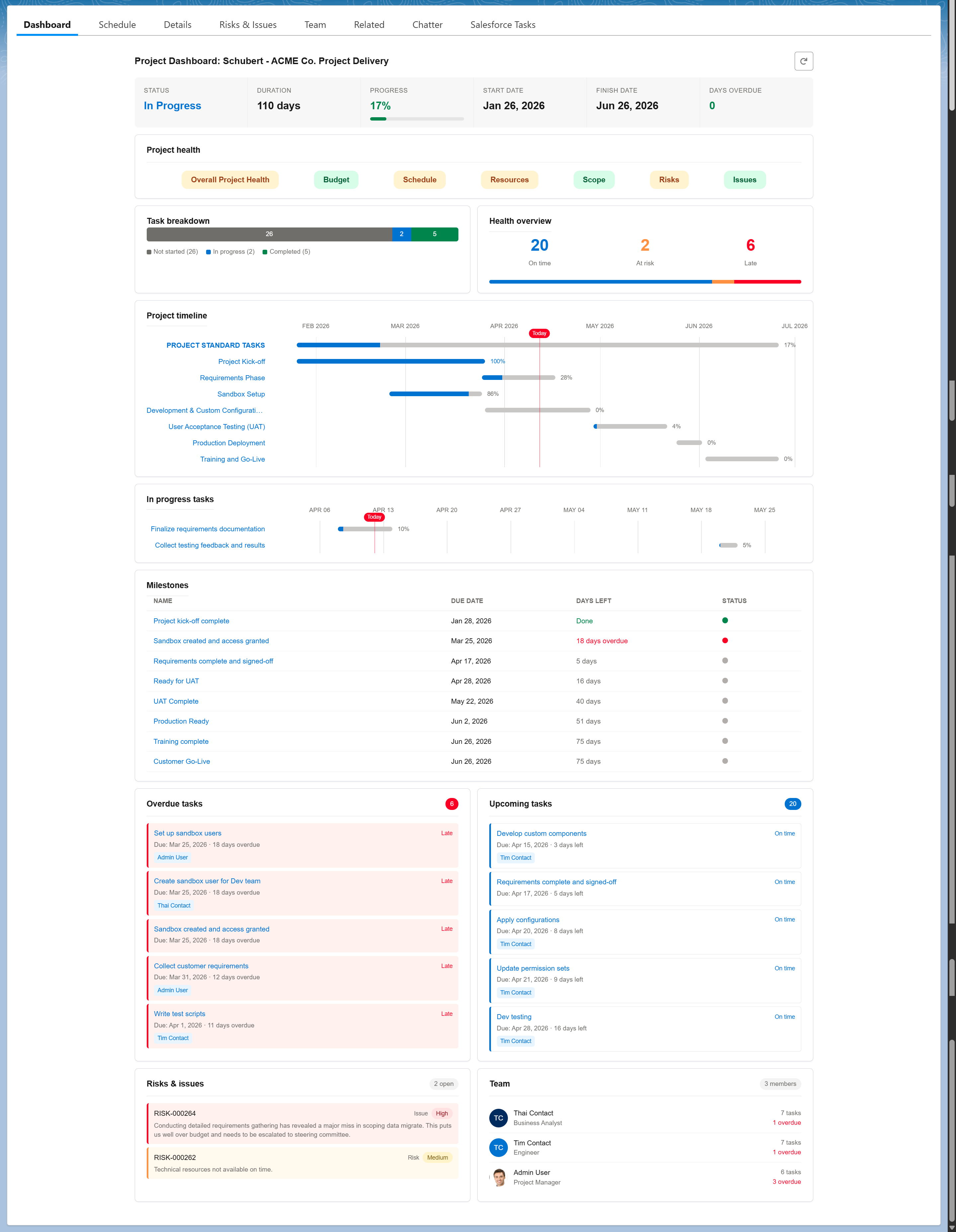
Project Dashboard — built into every project record
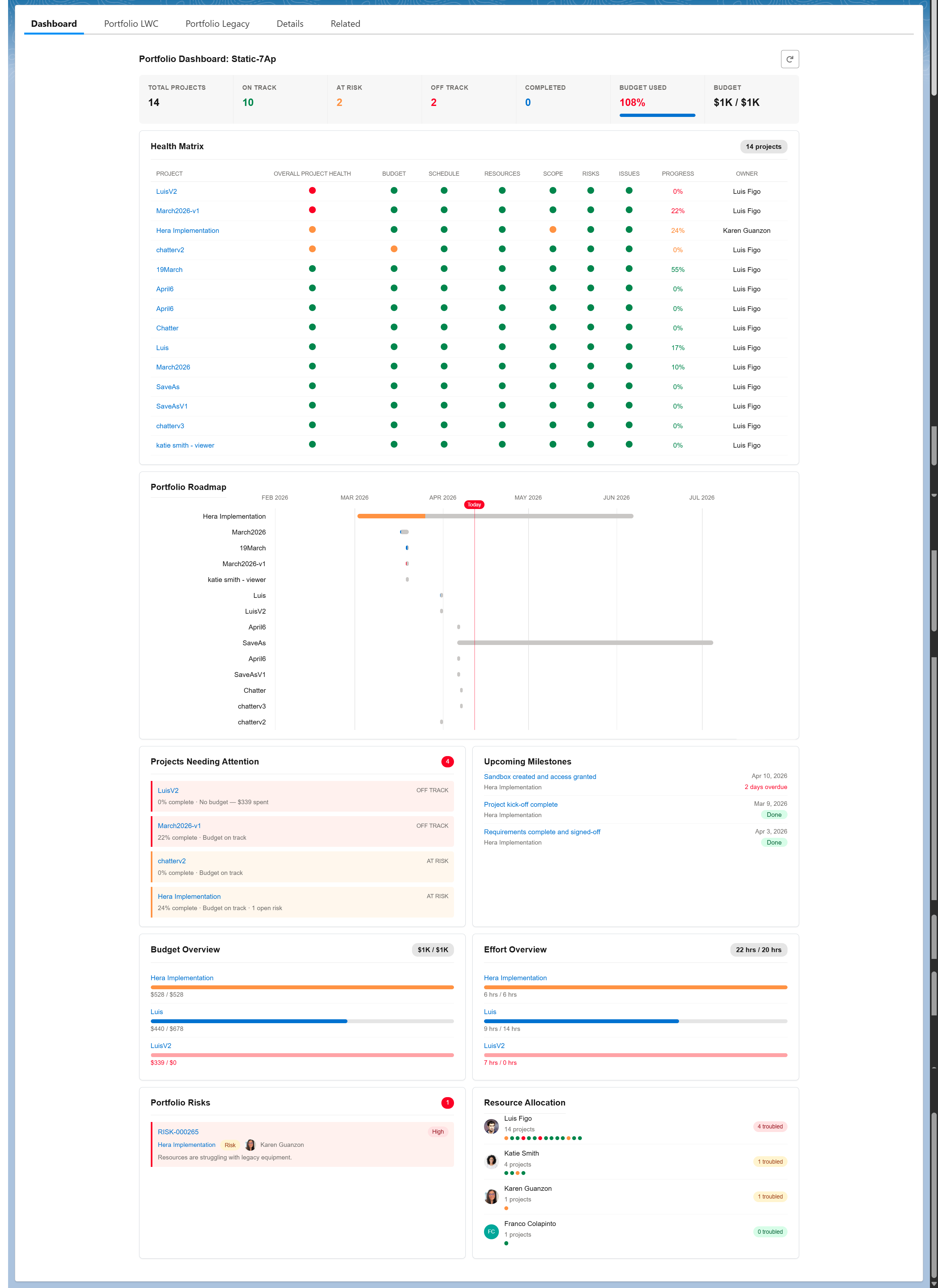
Portfolio Dashboard — executive-level visibility across all projects
Task Console — Cross-Project Visibility
The Task Console gives project managers a single screen to view and manage tasks across every project in the org. Four view modes (My project tasks, All my tasks, All project tasks, All tasks) let you switch between personal and team-wide perspectives. Tasks can be grouped by due date, health, status, priority, assignee, or project — with KPI summary cards updating in real time.
Critical path and ready-to-start indicators, inline status editing with automatic % Complete sync, and time logging directly from the console mean project managers rarely need to navigate into individual project records for day-to-day task management. TaskRay does not offer an equivalent cross-project task management console.
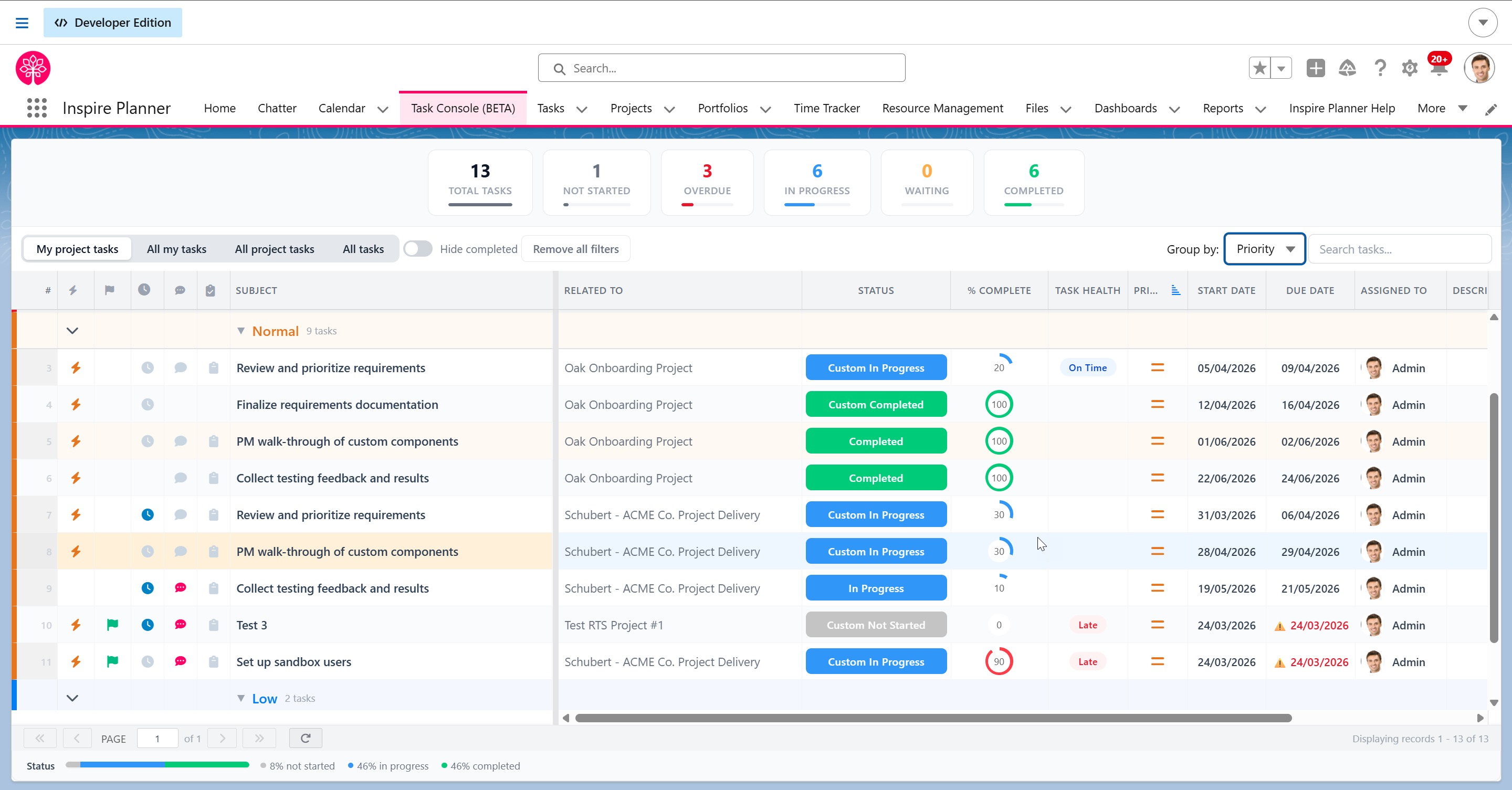
Task Console — manage tasks across all projects from one screen
External Portal with Full Dashboard
Inspire Planner's External Portal gives external contacts a full project experience: view project schedules and dashboard, update task status and progress, use checklists, and communicate with the internal team via task-level chat — without requiring a Salesforce license.
TaskRay offers three external collaboration models: Collaboration View (read-only project status), Collaboration Connect (assigned task completion without full TaskRay access), and Collaboration Hub (a fuller portal experience built on Salesforce Digital Experience Sites that requires designated external licenses). The key difference is that Inspire Planner's portal requires no additional licenses for external contacts, while TaskRay's most comparable offering (Collaboration Hub) requires Digital Experience Sites and designated external licenses.
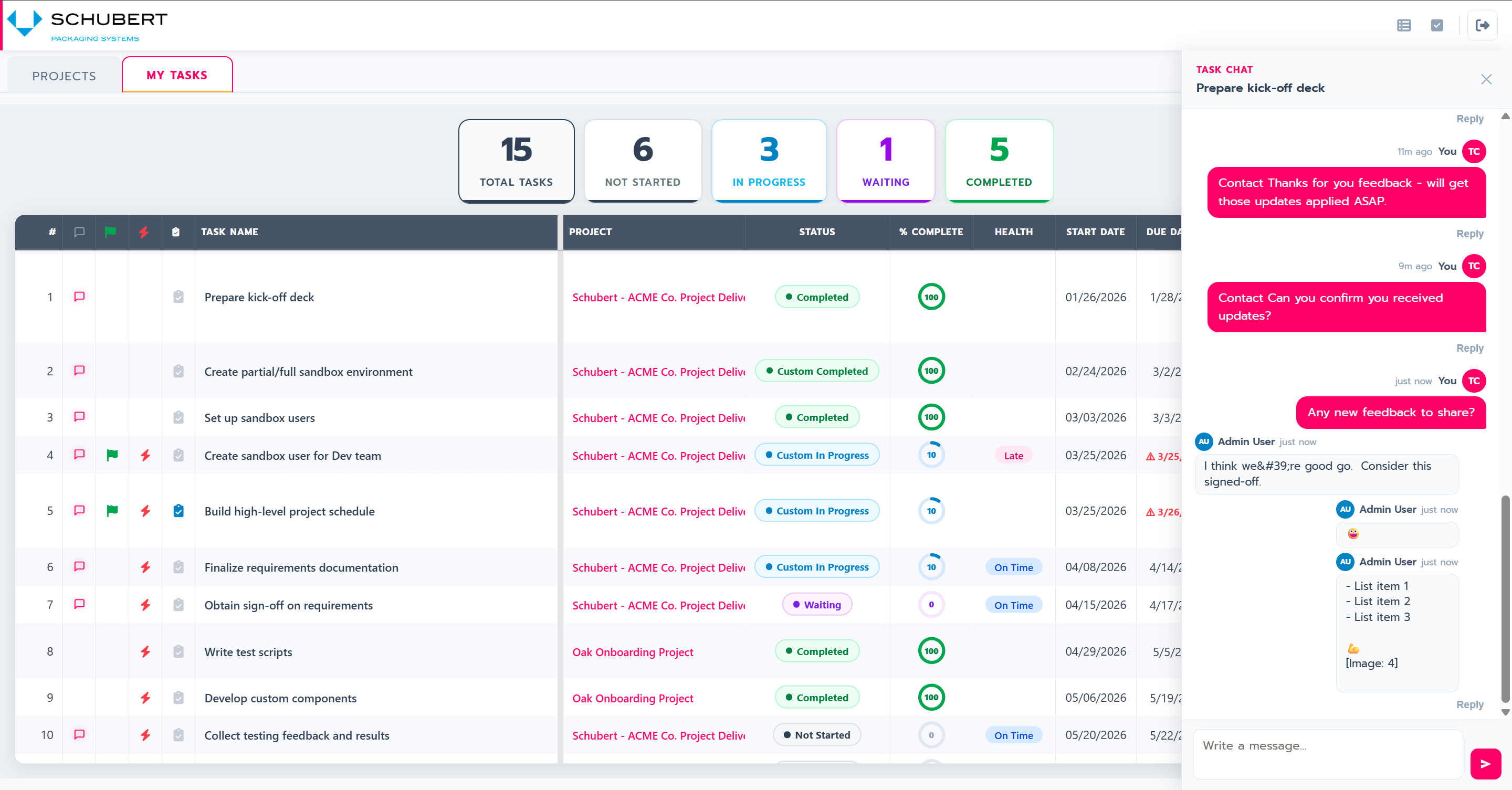
Portal Task Chat — in-context communication synced to Salesforce
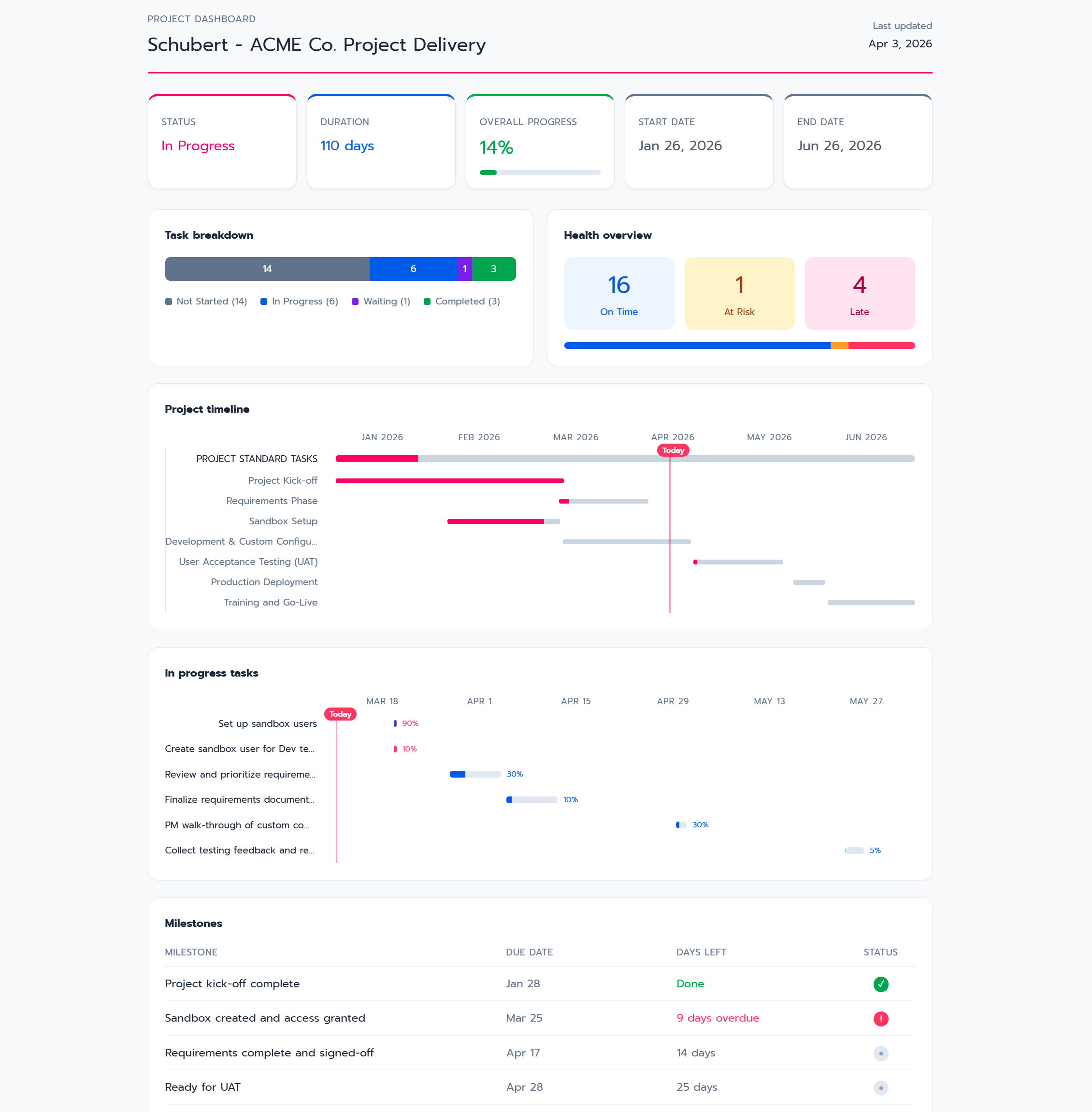
External Portal Dashboard — full project visibility for external contacts
Where TaskRay Stands Out
Customer Onboarding Focus
TaskRay has built a strong reputation specifically for customer onboarding workflows. If your primary use case is standardizing how new customers are implemented and onboarded after a sale closes, TaskRay has deep experience in this niche. Their positioning, templates, and documentation are heavily optimized for the onboarding use case.
Inspire Planner supports customer onboarding as well (with template stitching and portal access), but it's positioned as a broader project management tool rather than an onboarding-specific tool.
Agentforce Integration
TaskRay has launched an integration with Salesforce Agentforce, enabling AI-powered project assistance that can prioritize work, flag risks, and suggest next actions. This is a forward-looking feature for teams investing in the Agentforce ecosystem.
Established Market Presence
Founded in 2010, TaskRay claims over 1,000 customers in more than 100 countries. They have a well-known brand among Salesforce partners and implementation consultants who have built delivery practices around the product. If your Salesforce implementation partner has existing TaskRay expertise, that familiarity can reduce implementation time.
Strong Customer Support
Multiple reviewers across platforms consistently highlight TaskRay's responsive support team as a significant positive. "The team at TaskRay is fantastic" is a common theme in user reviews across AppExchange, G2, and Gartner Peer Insights.
Clean Kanban Interface
TaskRay's drag-and-drop Kanban interface is frequently praised for visual clarity and ease of use in daily task management. For teams whose workflow centers on moving cards across columns, TaskRay's board experience is polished and intuitive.
Pricing Comparison
- Waterfall projects with Gantt charts
- Agile/Scrum with Kanban boards
- Task List projects
- Unlimited templates
- Standard Salesforce automation
- Everything in Core, plus:
- Time Tracking
- Resource Management
- External Project Portal
- Portfolio Management
- Risk Register
- Minimum 10 users
For a team of 20 users:
Inspire Planner Pro: $35 × 20 users × 12 months = $8,400/year
TaskRay Standard: $40 × 20 users × 12 months = $9,600/year
TaskRay Premium: $60 × 20 users × 12 months = $14,400/year
The right comparison depends on which TaskRay edition matches your feature requirements.
Pricing based on publicly available AppExchange listing data as of April 2026. TaskRay's pricing page routes to sales for current quotes — contact TaskRay directly to confirm current pricing and edition features. Contact each vendor directly for current pricing and licensing options.
What Users Say
Inspire Planner Reviews
“I reviewed 31 software solutions, some with cute bells and whistles, but not the substance needed. The only one that met all the needs was Inspire Planner.”— Marshall Bilodeau
“Installing was easy. The UI is awesome and has nothing to be ashamed of when comparing to better-known apps.”— Kevin Potter
TaskRay Reviews
“Taskray has become a core part of how we manage projects and delivery. It gives us strong structure and visibility while still being flexible enough to support different implementation types.”— G2 Verified Review
“The product potentially can be expensive depending on which edition you purchase, so carefully evaluate which edition you need.”— Gartner Peer Insights Review
Both Inspire Planner and TaskRay are highly rated on AppExchange with identical 4.95/5 ratings. The difference isn't in customer satisfaction — it's in what each product offers for the price.
Review counts as of April 2026. Check AppExchange for current figures.
Frequently Asked Questions
Are both Inspire Planner and TaskRay 100% Salesforce-native?
Yes. Both applications are built entirely on the Salesforce platform and store all data inside your Salesforce org. Neither requires external servers or data synchronization.
Can I migrate from TaskRay to Inspire Planner?
Yes. Because both tools store data in Salesforce, migration is possible using standard Salesforce data tools. Contact Inspire Planner for migration assistance.
Which tool is better for customer onboarding?
TaskRay has strong positioning in customer onboarding specifically. Inspire Planner also supports onboarding workflows with template stitching and the External Project Portal, but offers broader project management capabilities including full Waterfall methodology and time tracking.
Which tool is better for complex project schedules?
Both tools support Gantt charts with four dependency types (FS, SS, FF, SF) and baselines. Inspire Planner is designed as a schedule-first tool with critical path analysis built into the core workflow. TaskRay supports these capabilities in Standard and Premium editions but is primarily positioned around onboarding and delivery workflows where Kanban boards are the primary interface.
Do both tools work with Salesforce Flow?
Yes. Both tools can be automated using Salesforce Flow. Inspire Planner uses standard Salesforce Tasks, which means existing task-based automation works out of the box. TaskRay uses custom task objects, which may require new automation to be built.
Does TaskRay use standard Salesforce Tasks?
No. TaskRay uses custom task objects within its managed package. This means project tasks exist separately from standard Salesforce Tasks, requiring separate reports, dashboards, and automation. Inspire Planner uses standard Salesforce Tasks, so project tasks appear in your team's regular task lists, and existing task-based reports and automation work out of the box.
What are the minimum purchase requirements?
Inspire Planner has no minimum user requirement. TaskRay's Starter plan requires a minimum purchase of 10 users.
Ready to See the Difference?
Try Inspire Planner free for 30 days. Full access to all features.
No minimum user requirement. No credit card needed.